Overview
This article introduces the complete Procedure, from preliminary checks to starting operation of Secure Transfer, for customers who are using (or planning to use) Access Control and are implementing Secure Transfer.
What You Need
-
HENNGE One Customer Portal account
Check the Login URL for the Secure Transfer administration screen and the information for the initial Operator account.
For the Procedure to check this information, see [Customer Portal] Checking the List of HENNGE One Services. - An account with the Access Control Global Operator Role
Notes
- The content of this article is based on product information as of October 2026 and may be changed without prior notice.
-
It is necessary to create downloaders who will use Secure Transfer in Access Control in advance.
[Access Control] New User Creation / Edit -
Be sure to check HENNGE One System Requirements before implementation.
Information on restrictions for each product and feature is provided.
Table of Contents
-
Secure Transfer Access Policy Settings
- When using an existing access policy group
- When creating a new access policy group
-
Checking Tenant Settings and Performing an Operation Test
- Changing tenant settings
- Secure Transfer operation test
Procedure
1. Secure Transfer Access Policy Settings
Access the Access Control administration screen and configure permissions to use Secure Transfer.
If an access policy group already exists in Access Control, you do not need to Create a new access policy group.
When using an existing access policy group
-
[Access Control] Creating/Editing Access Policy Groups
In [Allowed Service Providers] for the Target access policy group, Accept Secure Transfer.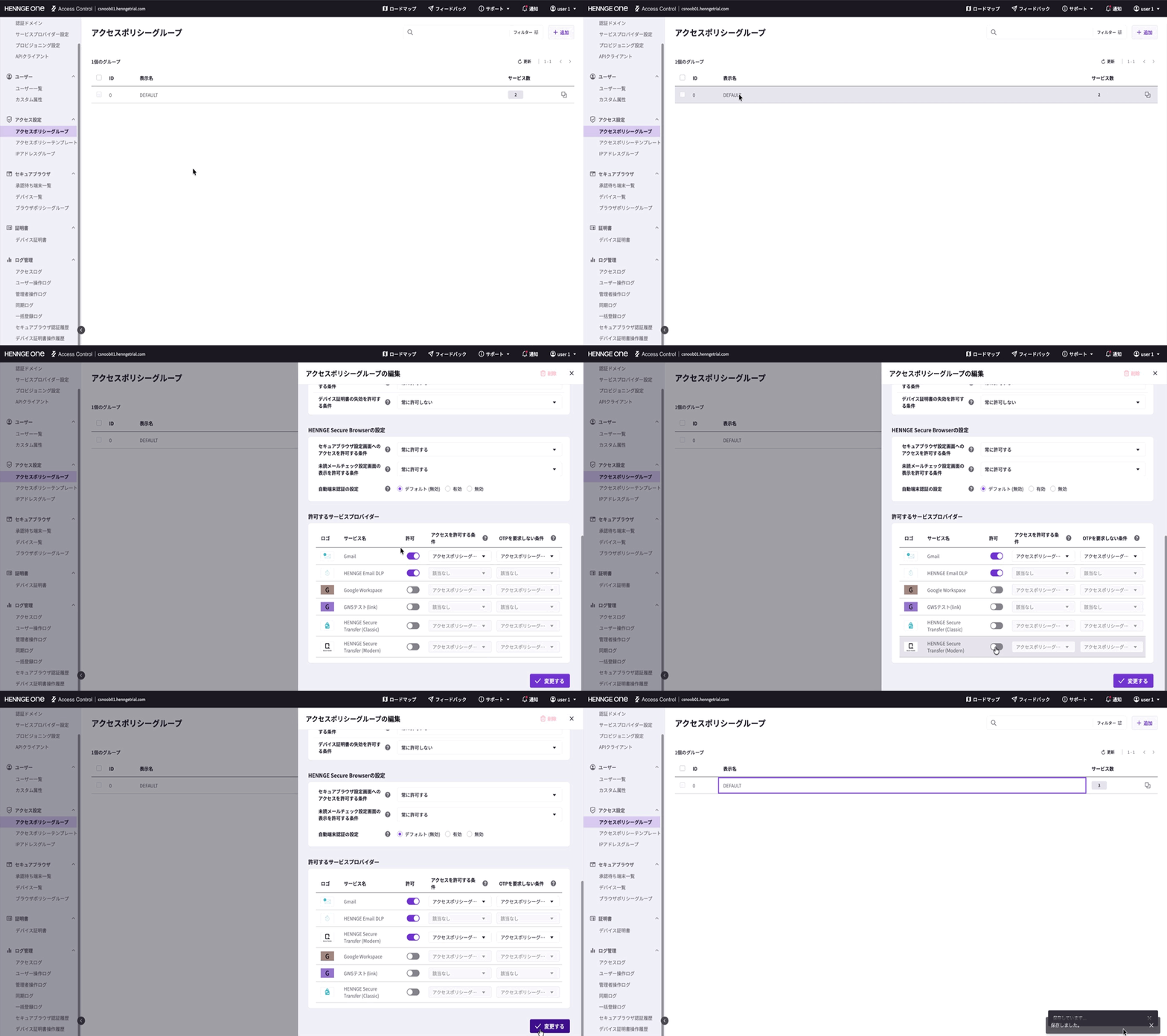
When creating a new access policy group
-
[Access Control] Creating/Editing Access Policy Groups
Access the Access Control administration screen and Create an access policy group.
※ In [Allowed Service Providers], Accept [Secure Transfer]. -
Assign Access Policy Group to Users (Modern View)
Assign the access policy group to downloaders created in Access Control.
Checking Tenant Settings and Performing an Operation Test
Login to Secure Transfer with an Operator account and change the tenant settings as necessary.
If the options for changing tenant settings are not displayed, please Login with an Operator account.
-
[Secure Transfer] Changing Tenant Settings
Consider security policies and other settings for using Secure Transfer, and change the settings as necessary. -
HENNGE Secure Transfer (Modern) Login Test
Login to Secure Transfer and test that the service can be used as expected.
This completes all Secure Transfer implementation tasks.
Deployment to End Users
When deploying to end users, use the following article as a reference to inform them how to Login to and use Secure Transfer.
Information to Be Provided to End Users When Starting to Use HENNGE One
Translation Disclaimer
This article has been automatically translated from the original Japanese version for your convenience.
While we strive to ensure accuracy, we cannot guarantee its reliability or completeness.
In the event of any discrepancies or questions regarding the content, the official Japanese version shall prevail.